
Last updated September 2025
What is it?
A Folder is a database for you to store partners or projects. A database of partners will show different information (e.g., financial or company information) from a database of projects (e.g., start and end date).
Dependent on your organization's package, you might have a folder for:
- startups
- other partners (e.g., corporates, VCs, universities)
- projects
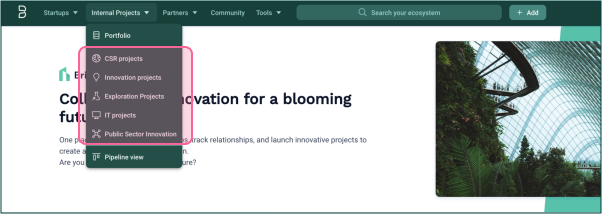
In the Projects or Partners Folder, you can have sub-folders or, as we call them, typologies. These allow you to categorize different types of projects or partners. These different types can also have their own unique configurations.
Each typology can be configured with its own workflows, tags, fields, labels, scoring, or qualification forms. This allows you to tailor it to your specific needs and track the information that is most relevant to your organization.
We do not enable typologies in the startups folder. Watch this space!
How to use it?
When you click on a folder or typology, you’ll see a full list of the projects or partners contained within it, as well as descriptive information about each.
Which folders you have access to depends on the package your organization has purchased. The names and structure of existing folders are typically configured by administrators with the help of a Customer Success Manager from Bloomflow.
Managing Rights and Permissions
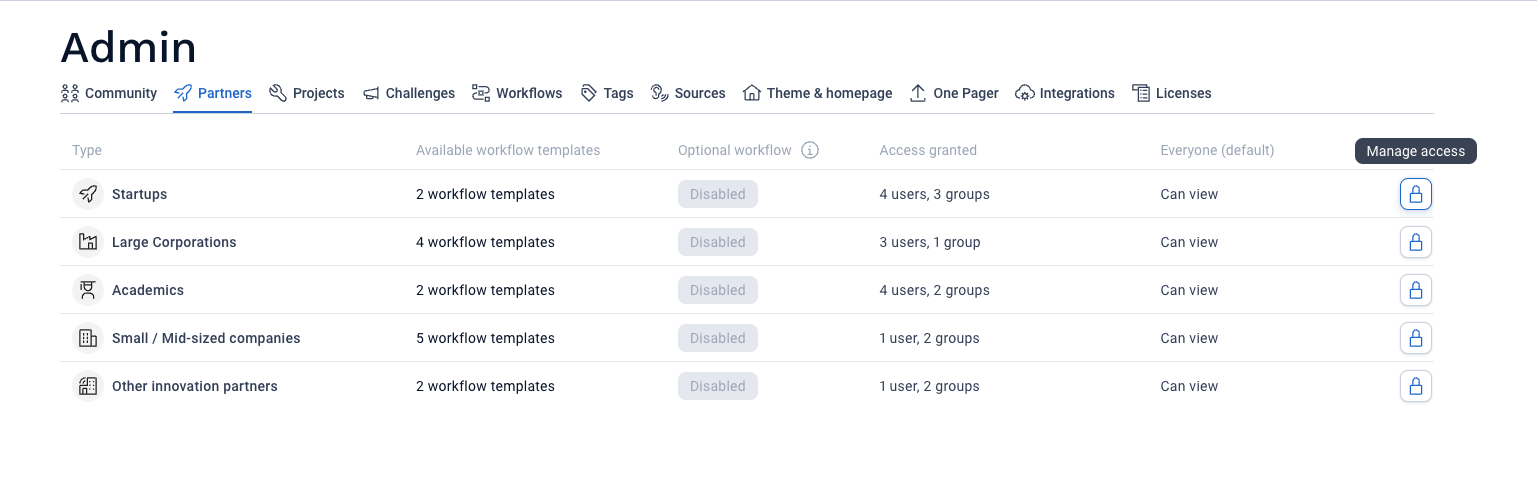
Platform administrators can manage rights and permissions of typologies in the admin panel. In each Folder tab (Partners, Startups, and Projects), you will find the lock icon to manage access to each typology.
Recommendations
It is important to consider what you want to track when deciding which folders to use.
Examples of partner folders:
- Traditional companies
- VCs/Incubators
- Academics
- Public Sector Organizations
Examples of project folders:
- CSR Projects
- Innovation Projects
- Exploration Projects
- IT Projects
Comments
0 comments
Please sign in to leave a comment.