
Last updated September 2025
What is it?
A tag is a categorization tool for your innovation partners and projects. They can be attached to partners, projects, users, and needs and are visible on the right hand side of the status page of each item.
Tags are a crucial element on Bloomflow: they give you the power to qualify your data, organize your portfolio, find information in it and run analytics on it. They are everywhere, and they reflect the way you understand your innovation ecosystem.
How to use it?
There are three tiers of tags: tag category, parent tag and child tag. We call the structure of your tag categories, parent tags and child tags your ‘tag tree.’
Each category can have unlimited parent tags, and each parent tag can have unlimited child tags.
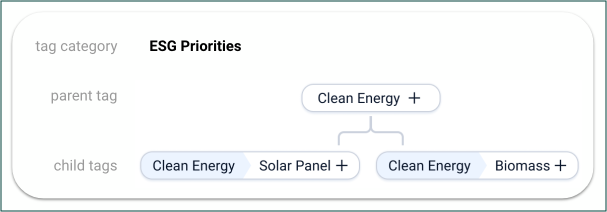
When qualifying a project or partner with the child tag ‘Solar Panel’, it will automatically be tagged as the parent tag ‘Clean Energy’. And when looking for ’Clean Energy’ solutions in the Search function, you will find all solutions relating to solar panels and biomass - without exception.
If you are a Platform Admin, you can view the tag tree in the admin panel. From here you can add new tag categories, edit existing ones, and add parent and child tags. To learn more about tag from a platform Administrator perspective, check out our article about managing tags.
As an end user or contributor, you have the ability to suggest a new tag if you cannot find one that matches an item you are adding to the portfolio. Once suggested, the tag will be reviewed by a Platform Admin, who will then decide to either officially add it to the tag tree or discard it.
To learn more about tag from a platform Administrator perspective, check out our article about managing tags.
Finding and Filtering with Tags
On Item Pages: You can quickly identify an item's focus by looking at the tags displayed on the right-hand sidebar of the partner or project status page.
In the Portfolio: Tags are powerful filtering tools. In your Portfolio or Pipeline views, use the tag filter on the top of the screen to select specific tags and instantly narrow down your list to the most relevant innovation partners or projects.
Recommendations
You can use tags to qualify partners and projects based on objective criteria, and also to highlight subjects that are particularly important to your organization.
If you have specialized teams or want to focus on specific subjects, you may need to create subcategories within your tags. This will allow you to provide more detailed information and make it easier for teams to track their progress.
See the below example of how an organization might tag its portfolio of startups
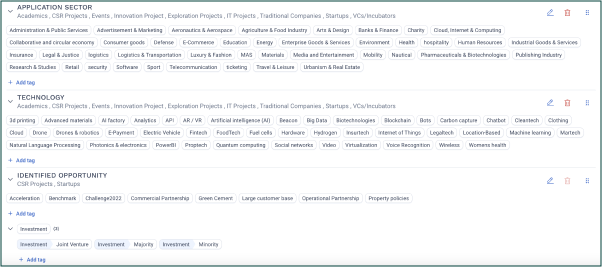
Remember that your tag tree is an organic entity that will evolve and change over time. If you have any questions or need guidance on your tag tree, contact your Customer Success Manager.
FAQ
Is it possible to mass delete tags?
No, it is not possible to mass delete tags, but it is possible to add tags to multiple partners/projects at once in the productivity view.
Comments
0 comments
Article is closed for comments.