
Last updated February 2023
What is it?
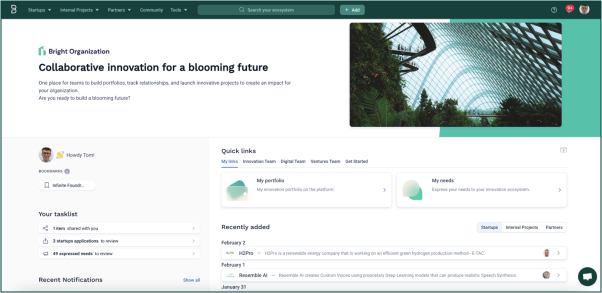
The homepage is your entrance to Bloomflow and the functions of the platform. You can:
- Access and search your portfolio of partners or projects
- Add startups, partners, projects and needs to the platform
- See all information specific to you e.g., your notifications, bookmarks, tasks and items shared with you
- Access Quick Links that will take you to other parts of the platform or external sites
How to use it?
Admins can customize the homepage to communicate your organization’s vision for Bloomflow and explain to users how to use the platform:
- Edit the banner, image, title and description in the Admin Panel.
- Edit the Quick Links (add sections, links, and thumbnails) in the Admin Panel.
- Change your logo by speaking to your Customer Success Manager.
Recommendations
When customizing your homepage, it is important to think about how you communicate your organization’s vision for innovation and for using Bloomflow. This is the first page that users see. It should clearly set out your goals when using Bloomflow, and direct users to important information.
Some organizations do the following:
- Create Quick Link sections based on different teams or objectives (as shown above).
- Create an onboarding video or FAQ document that can be accessed from a Quick Link.
- Create a Quick Link that directs the user to a pre-filtered view of the portfolio e.g., all startups from a particular country or from a certain sector
- Choose an image and description that sets out a clear and inspiring vision for innovation in the organization and makes clear to users what they should be using Bloomflow for.
Comments
0 comments
Please sign in to leave a comment.