
Last updated August 2024
What is it?
An entity is a group of users. Usually these groups are based on teams, but can also be functions, projects, or department.
Having clear entities on the platform can have several benefits for your organization, including:
- Improved communication: Being able to Identify the right contact on the platform allows better collaboration among teams, which can lead to more effective problem-solving and decision-making.
- Enhanced accountability: With clear team classification, it is easier to hold individuals and teams accountable for their actions. This creates a stronger sense of ownership, which can improve performance and productivity.
- Better reporting: Clear team classification makes it easier to report on the performance of teams. This helps leaders make informed decisions about resource allocation and track progress on a team-by-team basis.
- Increased motivation: Team members can be more motivated when they understand how their work impacts the organization. Clear team classification creates purpose and belonging, leading to increased engagement and motivation.
How to use it?
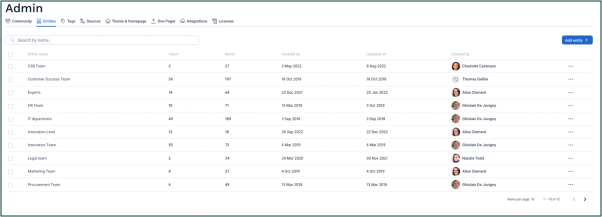
Admins can create, edit and delete entities in the Admin Panel of the platform.
Entities can be attached to workflows to show which groups are responsible for innovation processes. Multiple entities can be attached to multiple workflows too.
It can be made mandatory for new users to log their entity when logging in to the platform - contact the Customer Care Officer if you would like to enable this. The CCO can also help if your organization changes and you need to reallocate users to each entity.
Recommendations
In most cases, we recommend that you use entities to refer to specific teams in your organization.
If your organization has a matrix structure, entities might refer to different objectives, projects or programs. You can also then use tags as an additional categorization tool to give further information.
For example, if the Innovation Team works across several business units (such as Nutrition and Packaging), you could add a tag category for ‘Business Units’ to make clear that this workflow is connected to either or both of Nutrition and Packaging.
Comments
0 comments
Article is closed for comments.